Build something new
Make something new, with a direction you can shape.
On this page 5 sections
Describe the page you want to make. Impeccable helps you choose a direction, builds it, and reviews the result. No special command or visual concept required.
/impeccable design a pricing page for our enterprise customers- Describe the job
Say who it serves, what it should do, and what must stay.
- Choose a direction
Compare options and steer the design. Small additions can follow your existing style.
- Build and review
Try the interface and refine it. Impeccable records the decisions for future work.
Only need a plan? Start with shape.
Review a mockup or go straight to code
You can choose how a new design becomes a working interface. A comp is a visual composition: a detailed mockup of the page.
| Mockup first (comp-led) | Build directly (code-led) |
|---|---|
| The opportunity Bolder compositions and more creative visual directions than the coding model would naturally build. | The opportunity A more coherent first implementation, built within the coding model’s natural visual range. |
| You review Generated mockups, then the working interface against your chosen image. | You review A proposed concept, then its implementation in the working interface. |
| The tradeoff Image-to-code translation loses detail. Expect several rounds of prompting and review to get closer to the mockup. | The tradeoff The result tends to look better out of the box, but the execution is usually less ambitious than a comp-led direction. |
| You need Image generation, extra time and usage, and willingness to iterate. | You need No image generation. Review and refinement still matter. |
Comp-led is not a one-shot workflow. An image model can propose a composition the coding model cannot reproduce faithfully on its first pass. Typography, spacing, imagery, and proportions will drift in translation. Impeccable gives the build a visual target and helps check fidelity, but you should expect to prompt a few rounds until you are satisfied. Use a capable coding model for that work.
Choose mockup first for a higher visual ceiling you are willing to work toward. Choose build directly for a stronger first implementation within the model’s natural range. Without image generation, Impeccable uses the code-led path.
Use the workflow switch in the design picker for a session-specific choice:
Defaults and saving your workflow preference
With image generation available and no saved preference, Impeccable defaults to mockup first. Without image generation, it builds directly in code and does not show the switch.
The picker’s switch applies to the current session. To change the project’s default, ask in plain language:
/impeccable use code-led as this project's default for new design work
/impeccable use comp-led as this project's default for new design work
The setting is buildPath in .impeccable/config.json: comp or code. A value in .impeccable/config.local.json overrides the shared setting for that developer. See Configuration & ignores for the file format.
On a project without a saved preference, changing the switch can prompt a one-time question about keeping the new choice. Init can also establish the preference during setup.
These paths apply to new design work and redesigns. A focused polish pass keeps the current design. Either path can use generated images as finished assets; code-led skips the mockup approval stage.
Set how much can change
Tell Impeccable what it can change. A new section should fit the surrounding page; a new page should fit the product. For a redesign, name what to keep.
Redesign this within our current system. Keep the product names and signup flow.
Starting fresh, extending a system, or working with incomplete docs
- Add a section or component: it inherits the surrounding design.
- Create a page in an existing product: the visual system stays consistent; the layout can change for the task.
- Start fresh or redesign: the visual direction is open. Product facts, functionality, and constraints still apply.
Impeccable reads the actual interface, tokens, components, and assets alongside DESIGN.md. Missing documentation does not erase an established design. It can record that system before extending it.
If the boundary is unclear, Impeccable should ask. “Replace the current look” gives different permission from “Redesign within our current system.”
Choose a direction you want to pursue
Compare the options in the picker, then choose one or tell Impeccable what to change. Here, the same release catalog takes three different forms:
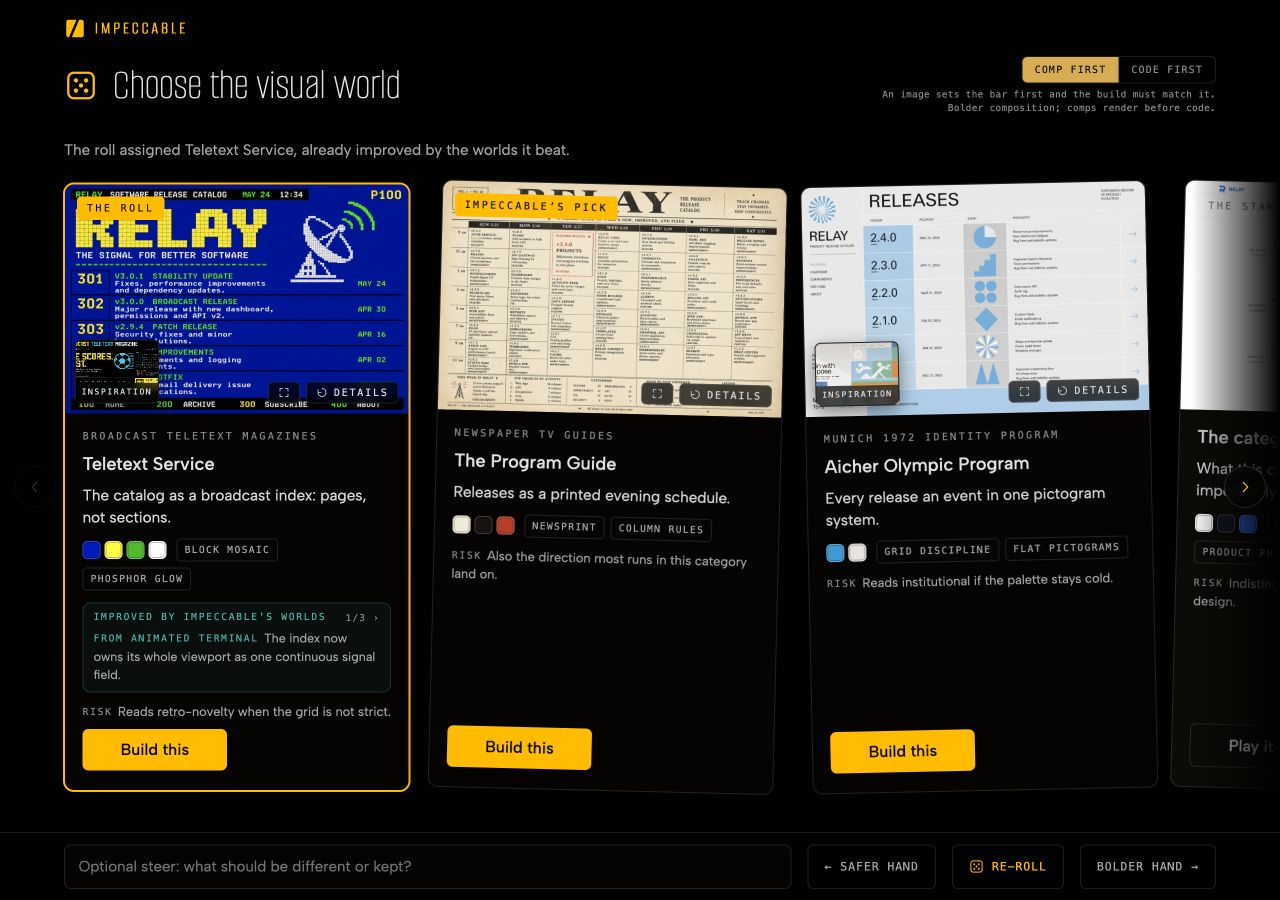
- Choose one: select Build this on the direction you want.
- Ask for another set: re-roll, or use Safer hand and Bolder hand to change the range.
- Steer the next round: use the text field to say what to change or keep.
- Keep it familiar: the category-standard option offers a conventional approach.
You can reject the whole set. After two consecutive new sets, Impeccable asks what quality is missing so the next attempt has a clearer basis. If the browser decision page cannot run, the choice moves into the conversation.
Example: a new page within an established visual system
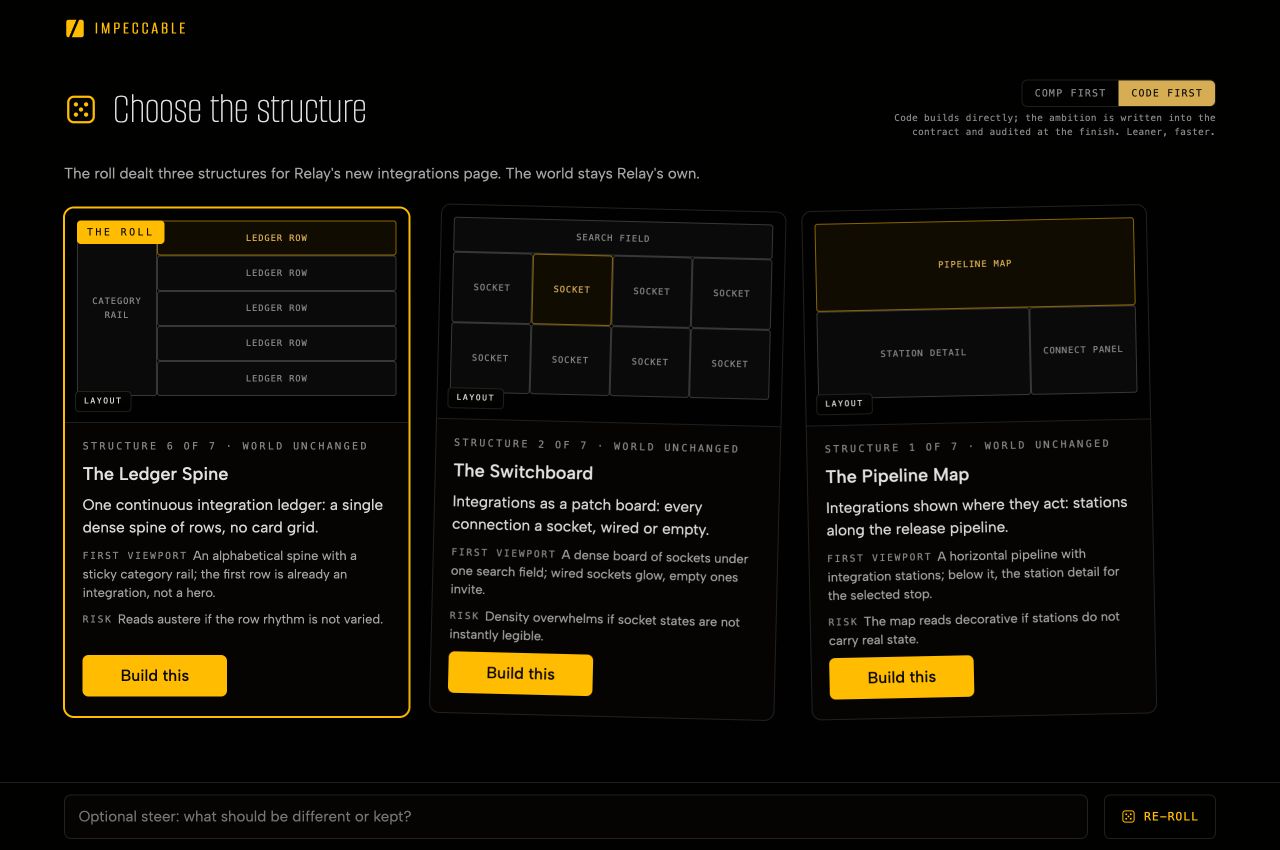
For a new page inside an existing product, the choice is about structure. These three layouts explore Relay’s integrations page while keeping its visual identity:
Already have a visual idea? Bring it in your prompt
Your references and constraints guide the design:
/impeccable design a landing page for our vinyl shop with a 1970s hi-fi catalog look. Use Futura and lead with the records.Impeccable develops the choices your brief leaves open. A chosen aesthetic is a starting point for a complete design, including navigation, controls, and interaction.
See a mockup carried into a working page
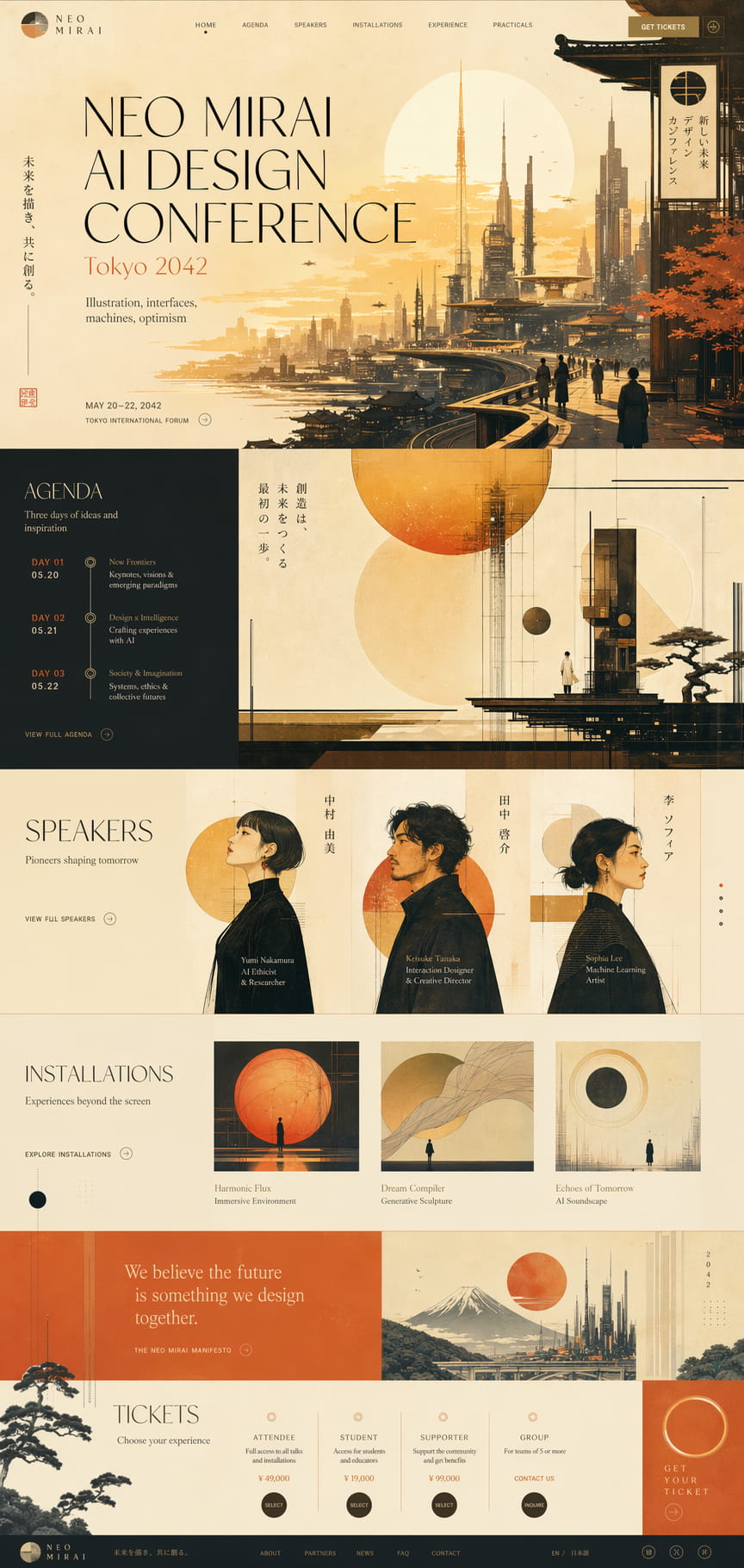
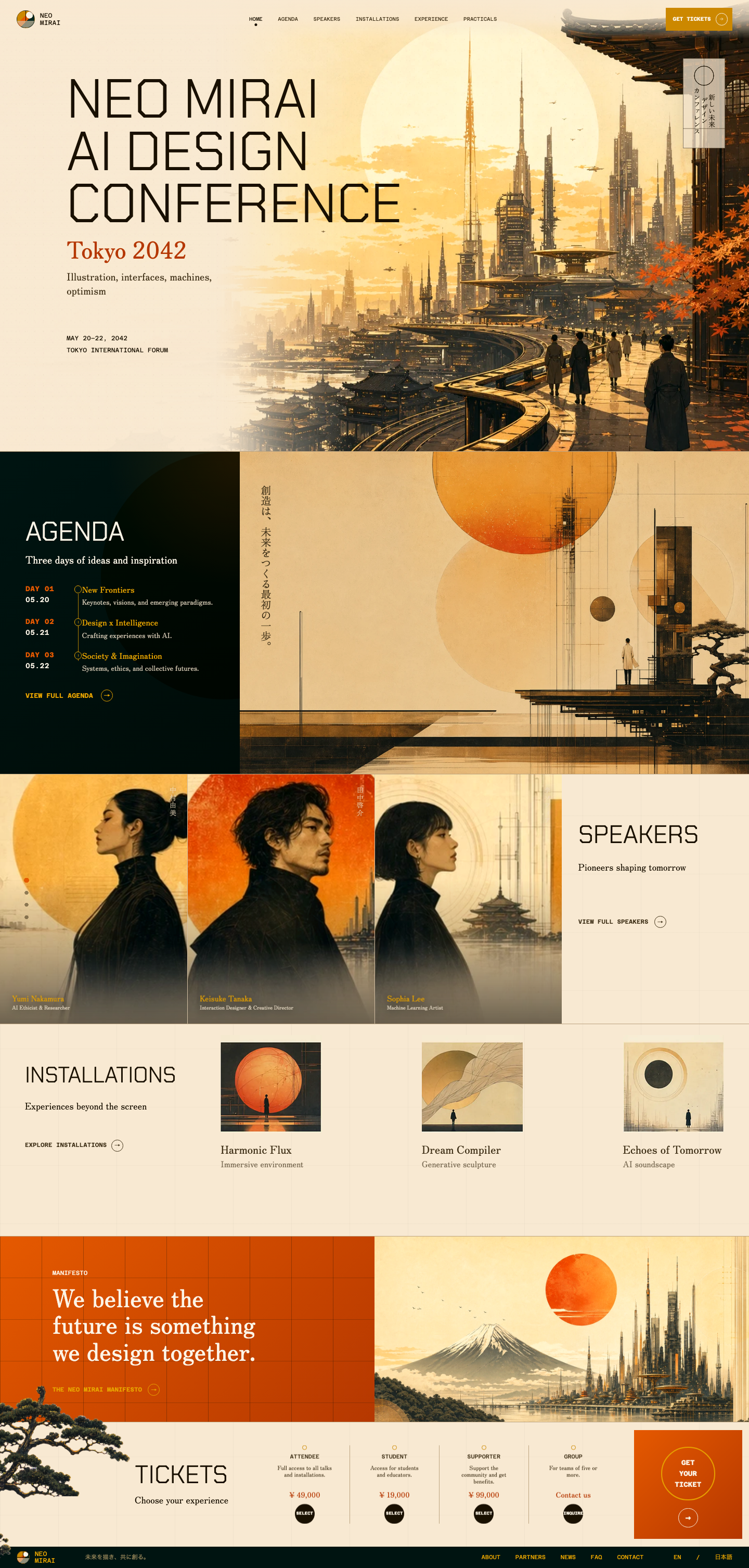
Compare the lettering, artwork, and section proportions: the overall direction carries through, but the translation changes details. Closing the gaps takes review and iteration. The implementation also needs readable text, working controls, accessible behavior, and responsive layouts.
After the build
Try the main task, check a narrow screen, and tell Impeccable what to keep or adjust. The chosen direction guides the review; the finished interface still needs to work for real users.
What carries into the next session
- The visual system: when the work establishes or replaces a design,
DESIGN.mdrecords the result after implementation and review. An ordinary addition follows the existing system. - The page’s decisions: a surface brief under
.impeccable/surfaces/records the page’s purpose, chosen direction, constraints, and unresolved questions. Future work can read why the design took this form. - The visual references: generated mockups stay under
.impeccable/mocks/, with their generation details and recorded approval where applicable.
The design plan belongs in the development record. It is not placed in the page’s HTML comments, hidden content, or other output sent to visitors.
Why the options go beyond the obvious
Creative prompts can still produce familiar answers. In Impeccable’s published July 2026 experiments, 30 of 35 answers under different creative framings returned the same concept. Read the research for the experiment and its limits.
Impeccable introduces variation into the selection process. It develops directions from your product and audience, uses a seeded selection to avoid always choosing the model’s first preference, and considers alternatives from a curated catalog when the visual identity is open.
Those references have to become a design for your product: its content, tasks, controls, and constraints. A catalog image shows inspiration and a level of finish, rather than a ready-made page to copy.
More about the process
How a proposed direction is evaluated
A direction has to fit the product before it reaches you:
- Truth: the claims and relationships it shows must be real. Illustrative data must be identified as such.
- Purpose: its structure must help someone understand the product or complete the task.
- Consequence: its distinctive move must improve the experience, beyond adding a decorative theme.
- Feasibility: it must work on the intended devices with the available assets, tools, and performance budget.
- Fit: its tradeoffs must respect your brief.
For a new page inside an established system, the alternatives explore structure within that system. For a new or replacement identity, they can explore a different visual language.
The written direction and the seed
The surface brief holds a short direction contract: the central idea, visual language, visitor’s path, first-screen composition, chosen form and seed, and what must be checked before the work is complete.
The finishing review uses those commitments to assess the result. For mockup-led work, it also compares the implementation with the approved image.
Keep the seed if you want to replay the selection, including its re-roll rounds. Replaying a selection does not guarantee identical generated images or code.
Delegated choices and unattended work
When you are reviewing the choices, Impeccable asks you to select a direction and approve the mockup where that workflow applies. You can also delegate a choice.
In an unattended run, it proceeds with the assigned direction and states its assumptions. If the decision page closes without an answer, it tries the conversation once before treating the run as unattended.
You can request fresh options for any reason. The agent’s own re-rolls require a concrete problem with the product’s facts or task; its personal preference is not enough.
Coming from the craft command?
/impeccable craft is a deprecated alias for ordinary new-work requests. You can describe the work directly to /impeccable.
Related
- Designing with Impeccable shows the wider workflow, from a first idea to maintaining the system.
- Shape helps you agree on the plan before building.
- Context files explains the records this process reads and writes.